

Find the context that made your agent answer wrong.
Debug why your AI agent gave the wrong answer — and prove the fix by re-running without the cause.
Why is a query, not a guess.
Inject less. Trace more.
Structure, where a bigger model used to be.
agentfootprint helps AI-product teams achieve equal or better response quality with lower-cost models by dynamically loading the right procedures and tools — and provides the infrastructure to deploy, debug, and scale that behavior.
| Layer | The customer's situation |
|---|---|
| End-customer benefit | Higher-quality responses |
| Business outcome | Equal or better quality using a lower-cost model |
| Mechanism | The skill graph selects the operating procedure and exposes only the relevant tools, instead of showing the model dozens of tools at once |
| Supporting activity | Infrastructure to integrate, deploy, debug, and scale that behavior — roughly 20 lines of declarations instead of hundreds of lines of hand-written orchestration |
| Economic benefit | Lower model spend, less engineering time, lower cognitive load |
- flat ~40-tool surface
- frontier model
- substantial orchestration code
- high inference + engineering cost
- task → relevant skill-graph node
- relevant procedure + small tool surface
- lower-cost model
- better observed response
The line count is the demonstration, not the point. The runtime takes the activity over: you describe the graph and its rules, it performs the per-iteration orchestration — and records why every handoff happened.
In one customer implementation, replacing a flat ~40-tool agent that required a frontier model with the dynamic skill graph enabled a lower-cost model to produce better evaluated responses at lower operating cost.
Every library in the family makes the same trade. The ecosystem through the business lens →
Don't take the claim on faith. Scroll the story — a wrong answer traced to its cause, the context that built it, and the engine that recorded it all.
It approved a refund it should have denied.
Somewhere in the context you fed it, one piece flipped the decision. Which one?
The run
classify → refund · check → continue · decide → approved ✗
Can't you just ask a model?
Three confident answers, none falsifiable.
02 · the solution
Give every piece of context an address.
Rules, skills, memory, and retrieved facts stop being one invisible prompt. Each piece has a named destination and a clear moment when it enters the run, so you can find it again when something goes wrong.
The model — what we abstract
Many flavors. Three slots.
The data and instructions you collect wear many names. Each lands in system, messages, or tools — and several land in more than one. Scroll to map each flavor to the slot(s) it really injects into.
When each one fires
Four triggers decide when.
A slot says where content lands; a trigger says when it fires. Scroll to watch each kind light up where in the loop it acts — from always-on rules to context the model unlocks itself by calling read_skill.
In your code
Declare the flavor. Not the prompt string.
You attach typed pieces — a fact, a rule, a skill. The framework decides which slot and which iteration each fires on, places the cache markers, and records every injection it makes.
const agent = Agent.create(({ provider, model })
  .system('You are a support agent.')
  .fact(defineFact(({           // data — always on → system
    id: 'user-profile',
    data: 'Name: Maya · Plan: Pro · since 2022',
  }))
  .steering(defineSteering(({   // steering — always on → system
    id: 'refund-policy',
    prompt: 'Never promise a refund before checking policy.',
  }))
  .skill(defineSkill(({         // unlocks via read_skill → system + tools
    id: 'billing',
    description: 'Use for refunds, charges, billing.',
    body: 'Confirm identity first, then…',
    tools: [refundTool, lookupCharge, issueCredit],
  }))
  .build();
How the assembly runs
The prompt recomposes every iteration.
The model reasons, decides which skill it needs, and the framework re-engineers all three slots— system, messages, and tools — around that decision. Tools the model can't use yet never enter the window, so the context shrinks to what each step needs — for tool-heavy agents, that’s where the savings come from. Scroll to walk the three iterations.
Task: “Refund my last charge.”
Classic ReAct
The loop re-runs the injection step, but only the Messages slot recomposes — System Prompt and Tools are cached after turn 1. So all 12 tools ride along every turn, whether the step needs them or not.
loop → re-engineer · only Messages recomposes · system + 12 tools cached
Dynamic ReAct — agentfootprint
Same loop — but all three slots recompose every turn. Injections that fired on the last tool result rewrite the next prompt; tools appear only once unlocked.
loop → re-engineer · all 3 slots recompose · 1 → 5 tools, on demand
Same machinery, a different agent
Why this tool?
Backtracking proved why a past run broke. The same recorded panel works forward too — a travel agent picks one of 4 tools by their descriptions. Scroll to reveal the scores, sharpen the tie, then swap scorers.
The agent picked search_hotels by its description. So — why this tool?
agentfootprint owns the detection — the scores, the ties, the recorded graph. You own the policy — the scorer, the rewriter. We map; you decide.
04 · how it works
The brain thinks, asks a tool, loops to the answer.
Every step is emitted as it happens — no extra tracing work and no story reconstructed later. agentfootprint remembers the real path while the agent runs.
The loop records itself.
As the agent runs, every event drains into a typed log — prompt · ask · return · answer — with its own cost. Scroll to time-travel the footprint you’ll later walk backward.
Step 1 / 12 — The turn begins — Context is assembled. It emits to the recorder as it happens.
Your agent is the event loop.
Same recorded run, viewed from the runtime side. A stage runs on the call stack and feeds its trace events into a queue. Opt into deferred delivery and the engine drains them at the next microtask — at each stage boundary, one beat behind, off the hot path.
Stage Context (1/12) — runs on the call stack and feeds its trace events into the queue, on the hot path.
the whole system
How it all fits together.
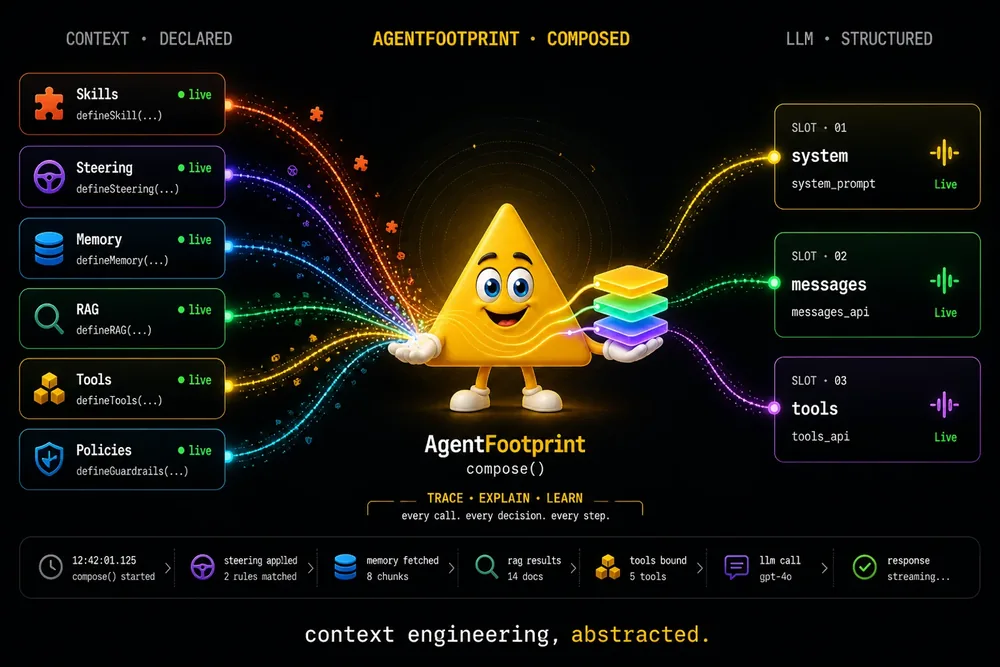
Skills, RAG, memory, rules — composed into the system / messages / tools slots, run, and recorded as a traceable footprint you can reverse.
Stop guessing why your agent answered wrong.
Record every run. Reverse it to the exact cause. Prove the fix by replaying it.